
Using Spanner with Video Sync
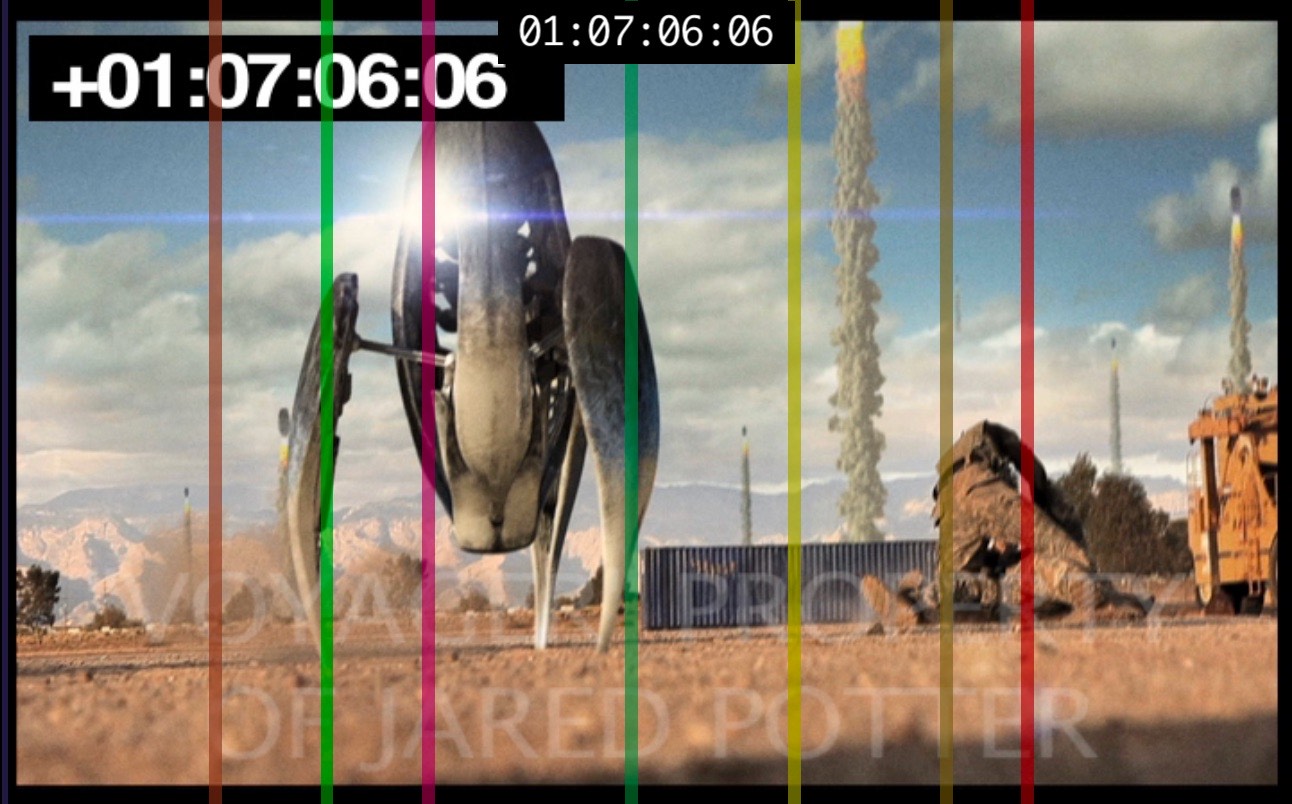
Video Sync includes direct integration with
Spanner from
The Cargo Cult.
This integration allows Spanner's pan positions to be displayed
as overlays in Video Sync. While earlier versions of Spanner
already supported overlays in Pro Tools' internal player window,
the integration with Video Sync enables the same overlays to be
displayed on external video devices as well.
Setup
Spanner sends MIDI data to Video Sync using Video Sync's virtual
trigger input port. As virtual MIDI ports are not propagated
over the network, Video Sync needs to run on the same machine
that is also running Pro Tools hosting the Spanner plug-in.
Ensure that Video Sync's trigger input is set to
Video Sync Trigger In (virtual) in the
Preferences / Settings →
GENERAL → MIDI section.
Open Pro Tools, insert Spanner on a track in the desired
configuration, and open the Spanner window. Spanner then sends
MIDI data to Video Sync, causing Video Sync to draw the pan
information as vertical lines (currently, only X values are
supported).
Video Sync draws the pan lines with almost complete transparency
around 5 seconds after the last pan information was received.
This reduces distraction and improves workflow when several
instances of Spanner are used simultaneously. Pan lines are only
displayed while a Spanner window is open; they are hidden when
the Spanner window is closed.
Position updates are very responsive when using Video Sync's
internal display. A short delay is expected when using external
video devices.
Troubleshooting Spanner overlays in Video Sync
Spanner pan lines are treated as standard overlays in Video Sync and are shown only if overlays are enabled for the relevant display device in the Device List.
No overlays will be displayed if Spanner cannot establish a connection to Video Sync, for example if Video Sync was launched after loading the session in Pro Tools. With only a few Spanner instances, re-establish the MIDI connection by Control & Command & clicking each instance twice to disable and then re-enable it. With larger sessions containing many Spanner instances, reloading the Pro Tools session is often the most efficient way to reconnect Spanner and Video Sync.